| Reference Number: AA-00730 Last Updated: 2024-05-01 13:40 |
Student Questions
Can my students use any web browser to access their Hawkes assignments within D2L?
We recommend your students use either Google Chrome or Firefox when accessing their Hawkes assignments within D2L. If students are using a browser other than Chrome or Firefox, they may receive the following error message: Oops The page you are trying to access cannot be loaded. It may have expired, or you may not have permission to it. If you believe that you should have permission to access this page, please contact your LMS administrator.
Can my students still access the eBook and Practice Tests if I'm using Direct links?
Yes! To make these resources easier for them to access, consider adding the Single Sign On tool to your course in addition to adding direct links.
Assignment Questions
If I delete an assignment from Hawkes, will it delete the assignment in D2L?
No, deleting an assignment in Hawkes does not remove that assignment from D2L. It will break the direct link (if one was created), but the assignment will still show up in your assignment list in D2L. If you want to remove an assignment from Hawkes and D2L, you will need to delete it in both places.
If I delete an assignment from D2L, will it delete the assignment in Hawkes?
No, deleting an assignment in D2L does not remove that assignment from your assigned list in Hawkes. If you want to remove an assignment from Hawkes and D2L, you will need to delete it in both places.
If I sync my assignments and then change a due date in Hawkes, will the due date update in D2L?
Hawkes due dates sync anytime auto grade synchronization runs, which occurs once daily typically overnight.
I created Direct links last semester, can I use them again?
Yes! You may use D2L's copy features to carry forward direct links created in a previous course into an upcoming/new course. However, in order for the links to remain valid, the original link to Hawkes must be maintained in the previous course (e.g. still linked via the Sync Tool and still assigned in that corresponding Hawkes section) until the assignments are assigned and linked in the new section, and must remain linked/assigned in at least one section at all times.
What can cause direct links to no longer work?
Direct links may become invalid if the course link is ever broken from the Grade Book (using Tools > Reset Grade Books), the assignment is unassigned in Hawkes, or the assignment is unlinked from within the sync tool (Assignments > 'Unlink LMS Column').
Additionally, the links may become invalid if the Hawkes Assignment is linked to a D2L Assignment that was not created by the Hawkes Sync tool. To avoid this, you must use the 'Create LMS Column' option on the Assignments tab of the Hawkes Sync Tool with the Direct Links option selected at the top.
Why didn't all of my assignments sync over from Hawkes to D2L?
This is likely because you had more than 40 assignments and did not select Show All from the Results drop-down to view all assignments.
Grading Questions
Do I need to set up my Assignment Groups in Hawkes if I'm keeping track of the student grades in D2L?
Hawkes Assignment Groups are independent of D2L, so we do recommend you still set up your Hawkes Assignment groups so that students will see an accurate grade if they select the Grade button within Hawkes.
If you're only assigning the Certify lessons in Hawkes, consider making one Hawkes Assignment Group weighed at 100% for those lessons so that students can see their overall homework grade in Hawkes.
If you are tracking some grades in D2L and not in Hawkes, but you're assigning more than just lessons in Hawkes, consider hiding the student's overall grade in Hawkes so that it does not display incorrectly for them. Set this up in your Hawkes Grade Book under Tools > Display Options. Deselect 'Display overall grade percentage' and 'Display overall letter grade.' Changing these settings will prevent students from seeing an inaccurate overall grade in Hawkes, and they will be able to see their accurate overall grade in D2L.
What do I need to update in D2L for students to see their accurate grade, including Hawkes assignments?
In order for the student grades to display accurately in D2L, you will need to enable assignment group weights in D2L and also properly categorize your Hawkes assignments into the correct groups. By default, all individual Hawkes assignments are categorized into one Hawkes group in D2L.
How do grades appear in D2L when synced over from Hawkes?
If your Hawkes Grade Book is weighted (which is the default setting in the Hawkes Grade Book), grades are synced as the total percentage points earned out of 100. If your Hawkes Grade Book is points-based, grades are synced as the total points earned out of the total points possible
What if I want to organize Hawkes assignment into weighted groups in D2L?
Assignment group weights can be created and adjusted from within the D2L Grade Book. You can then categorize your Hawkes assignments into the grading groups you create in D2L
If I sync over just Hawkes assignment groups and not all individual assignments to D2L, how and when do grades appear in D2L?
Grades for Assignment Groups that don't have any graded assignments yet will be synced differently than individual assignments, depending on the weight distribution chosen in Hawkes Assignment Groups. The below percentages will sync to D2L for Hawkes Assignment Groups when no due dates in that assignment group have passed. Once a due date has passed in the assignment group, the grades will update accordingly. (This % matches what is shown in the grade reports in the Hawkes Grade Book.)
Even: 0%
Proportional: 100%
Sum: 100%
Because the assignment group grades will not be fully accurate in D2L until after assignment due dates pass, we recommend syncing individual assignments (instead of Hawkes Assignment Groups) whenever possible. If you still want to sync over Assignment Groups, it is best to wait to map them until after the first due date has passed within the group.
Troubleshooting Questions
What if I linked my D2L course to the wrong section in Hawkes?
If you linked your D2L course to the wrong Hawkes section, you can break the link association in your Hawkes Grade Book by following the steps below:
- Select the Tools tab > Reset Grade Books
- Select the box next to the option 'Remove Section LMS associations, if any'
- Select the section that is incorrectly linked
- Select Reset Grade Book
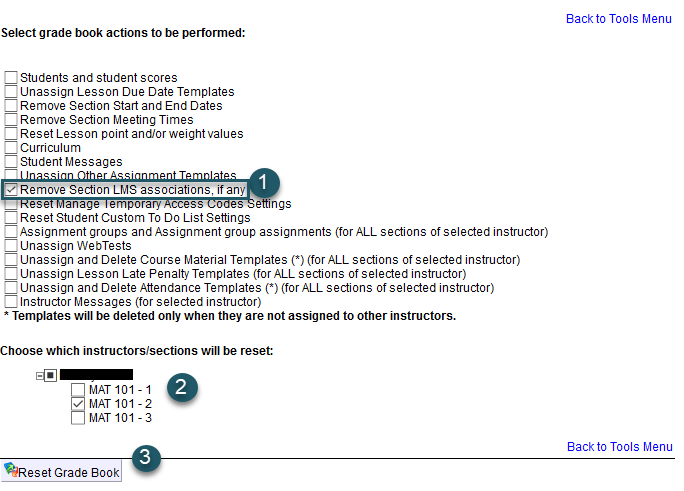
Once the reset occurs, return to D2L and walk through the synchronization process from the start to link to the correct Hawkes section.
Why are no Hawkes courses (e.g. College Algebra) appearing in the drop-down menu when I'm trying to link my Hawkes sections to D2L courses?
If your Hawkes course is not appearing in the drop-down menu as an option to link to in D2L, it means that this course is not yet linked to your teach.hawkeslearning.com account. To correct this, please sign in to https://teach.hawkeslearning.com, select the Add Course button and add the course either using the course invitation link or your old Grade Book credentials.