| Reference Number: AA-00801 Last Updated: 2025-12-29 11:36 |
What is Automatic Grade Sync?
Student grades will automatically transfer from Hawkes to Moodle. There are two options for automatic grade syncing.
1. Select a Moodle course and open the Hawkes Sync Tool.
2. Select the Schedule Sync tab.
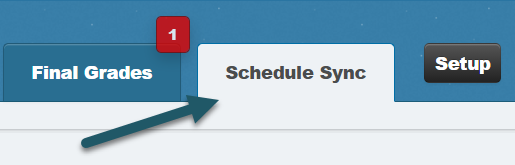
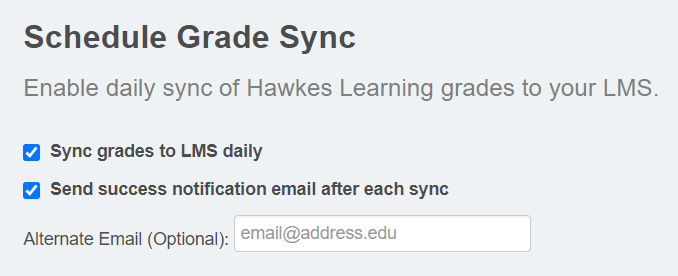
3. Select Enable Automatic Grade Sync and choose between "Daily" or "Immediate" sync.
Note: You cannot receive a daily success notification email for "Immediate" sync. This option is only available for "Daily" sync.
Note: If you toggle on "Immediate" sync after assignments have already been completed in Hawkes, grades will not retroactively sync. Please perform a manual sync to capture these assignment grades.

4. Click Save.
Hawkes Learning will be performing network maintenance on Sunday, February 21st & Sunday, February 28th from 4:00 AM to 8:00 AM (EST). All Hawkes Learning websites and services will be unavailable during this time.
Happy Holidays from Hawkes Learning!
Our office will be closed on 12/24, 12/25, 12/31, and 1/1.
Phone support will be available from 8 am - 5 pm ET on 12/22, 12/23, 12/26, 12/29, 12/30, and 1/2.
Please visit https://chat.hawkeslearning.com for 24/7 chat support.
Special Hours: Hawkes Learning will be closed for Independence Day on Friday, July 4th. Please start a chat session for immediate assistance. Have a great holiday!
Special Hours: Hawkes Learning will be closed for Memorial Day on Monday, May 26th. Please start a chat session for immediate assistance. Have a great holiday!
Labor Day: Hawkes Learning will be closed for Labor Day on Monday, September 1st. Please start a chat session for help and support. Have a great holiday!
Special Hours: Hawkes Learning will be closed for Thanksgiving on Thursday, November 27th and Friday, November 28th. Phone support will end at 5 pm ET on Wednesday, November 26th. Please start a chat session for immediate assistance. Have a great holiday!
| Enterprise Wiki by: KnowledgeBase Manager Pro v6.2.2 (Built with: JS.GUI - AJAX Code) |